Browser rendering is a dependency pipeline, not a one-time conversion of HTML into pixels. The browser streams bytes, discovers subresources, builds the DOM and CSSOM, computes styles and geometry, paints drawing commands, rasterizes layers, and composites a frame. JavaScript can interrupt or invalidate that work at several points. Reach for this model when a page shows content late, an interaction stutters, or a harmless-looking DOM read turns into a long main-thread task.
From Bytes to a Frame
- The HTML parser decodes bytes into tokens and incrementally builds the DOM. A preload scanner can discover scripts, stylesheets, fonts, and images before the parser reaches them.
- A classic script without
asyncordeferblocks HTML parsing while it is fetched and executed. Stylesheets normally do not stop DOM construction, but blocking stylesheets delay rendering. A parser-blocking classic script also waits for blocking stylesheets discovered before it, even when the script never reads computed styles. - CSS becomes the CSSOM. The browser combines DOM nodes and computed styles into the structures needed for layout;
display: nonenodes do not produce boxes. - Layout computes box sizes and positions. A geometry change can invalidate part of the layout tree and trigger another layout pass.
- Paint records visual operations such as text, backgrounds, borders, and shadows. Rasterization turns those operations into pixels for one or more layers.
- Compositing assembles the layers in z-order and submits the frame for display. A transform or opacity animation can often reuse existing rasterized layers, while animating
widthusually returns to layout.
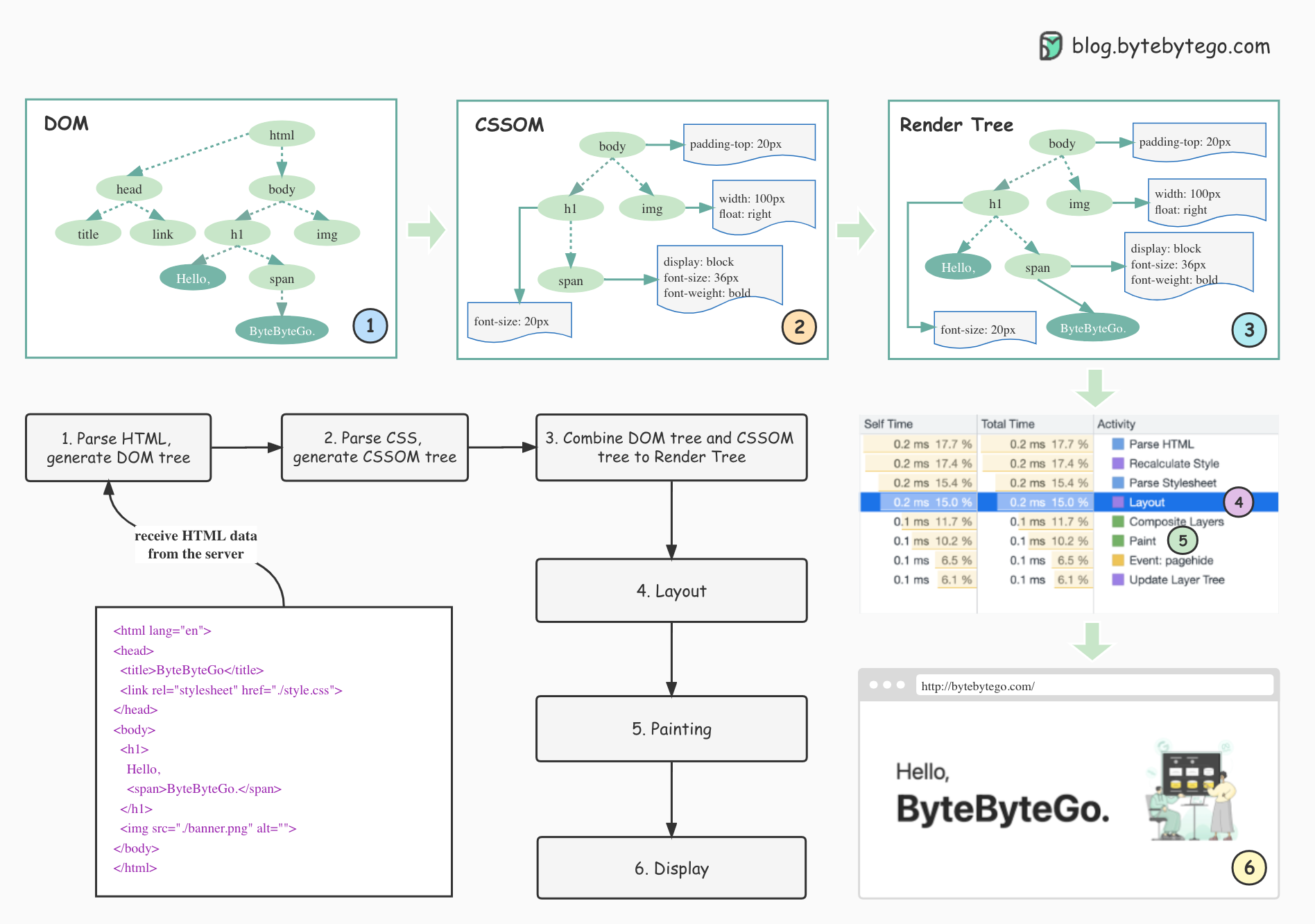
The diagram is a useful first-pass dependency order, not a sequence that runs exactly once. Modern engines pipeline work, render before every resource has arrived, and repeat style, layout, paint, raster, or compositing for the smallest invalidated region they can isolate.
Reflow, Repaint, and Jank
A DOM or style mutation marks rendering data dirty. Reading geometry immediately afterward can force the browser to finish pending style and layout synchronously:
for (const row of rows) {
  row.style.width = `${row.offsetWidth + 1}px`;
}
Each iteration reads offsetWidth, then writes a width. From the second iteration onward, that read may force style and layout work invalidated by the previous iteration’s write. Batch all reads before any writes so the browser can perform one layout:
const widths = rows.map(row => row.offsetWidth);

requestAnimationFrame(() => {
  rows.forEach((row, index) => {
    row.style.width = `${widths[index] + 1}px`;
  });
});
At 60 Hz, frames begin about every 16.7 ms; at 120 Hz, about every 8.3 ms. Input handling, JavaScript, style, layout, paint, raster, and compositing share that interval, so application code never owns the whole budget. A long script delays every later stage. Repeated layouts create layout thrashing. Expensive visual changes create repaint pressure. Too many promoted layers avoid some paint work but consume memory and add compositing cost.
Measure the browser trace before changing code. The useful distinction is which stage became expensive and what invalidated it, not whether the symptom is generically called “reflow” or “jank.”
References
- Populating the page: how browsers work (MDN) — end-to-end parsing, DOM/CSSOM, layout, paint, raster, and compositing mechanics.
- Critical rendering path (MDN) — render-blocking resources, repeated layout, and measurement-driven optimization.
- HTML Standard: the script element (WHATWG) — normative execution behavior for classic and module scripts, including
asyncanddefer. - How does the browser render a web page? (ByteByteGo, pinned source) — provenance for the overview visual; the note qualifies its simplified single-pass pipeline.