WebAssembly (Wasm) is a compact binary instruction format for a typed stack machine. A host validates a module, compiles or interprets it, supplies imports, and invokes exports. The browser is one possible host. A core Wasm module has no built-in DOM, file system, socket, clock, or process authority.
Wasm is useful when existing Rust, C, or C++ computation must run in a browser, when a plugin boundary needs explicit capabilities, or when one module should run under several compatible hosts. It is an execution format, not a complete application platform by itself.
Module and Host Boundary
A module contains functions, tables, globals, and optionally one or more linear memories. Validation proves that instruction types and stack effects are well formed before execution. It does not prove the algorithm correct, nor does it stop unsafe source code from corrupting data inside its own linear-memory region.
Imports are the authority boundary. In a browser, JavaScript can supply logging, time, or DOM adapters. The module cannot call those facilities unless the host imports them. Exports expose Wasm functions, memory, tables, or globals to the host.
const imports = {
  host: {
    log: value => console.log(value)
  }
};

const { instance } = await WebAssembly.instantiateStreaming(
  fetch("/math.wasm"),
  imports
);

const answer = instance.exports.add(20, 22);
Numbers cross this boundary directly. Strings, arrays, and objects usually require an ABI: the caller writes bytes into linear memory and passes an address and length, or generated bindings do that work. Frequent fine-grained crossings can cost more than one coarse call over a larger buffer.
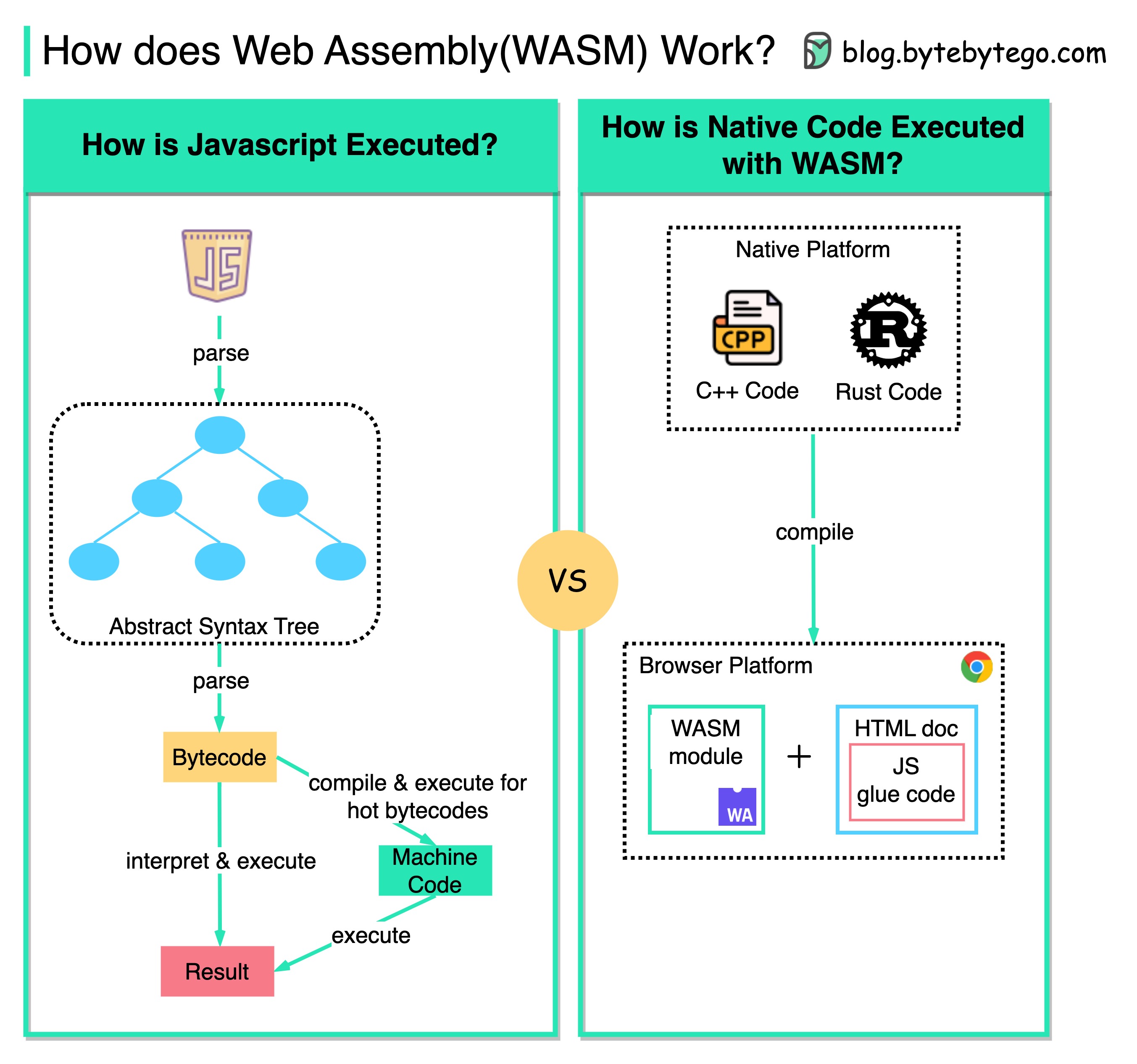
The image captures the compile-and-host relationship but oversimplifies both sides. Modern JavaScript engines also interpret and optimize/JIT code. C++ and Rust are compiled into Wasm instructions, not browser-native machine code shipped unchanged. Wasm can approach native throughput for suitable compute kernels, but it is not automatically faster than JavaScript.
Browser Wasm versus WASI
The WebAssembly core specification defines execution, not operating-system APIs. The browser embedding adds JavaScript and Web APIs under browser security rules. WASI is a separate family of standard host interfaces for non-browser and component-model workloads. A WASI runtime grants capabilities such as selected directories, streams, clocks, or network access. The module begins without ambient authority and receives only what the host grants.
The sandbox is one boundary, not a complete security argument. An overpowered host import can grant too much authority. Resource exhaustion still needs limits, and modules can read or modify any data deliberately shared by the embedding.
Transfer, Startup, and .NET
Wasm’s binary format supports streaming validation and compilation, but total startup includes network transfer, decompression, compilation, module instantiation, data initialization, and language-runtime startup. Small JavaScript can beat a large Wasm toolchain output before the first useful result. Measure cold start and transferred bytes as well as steady-state CPU time.
Blazor WebAssembly downloads the application, its dependencies, and a .NET runtime into the browser. Razor components and their event handling normally execute on the browser UI thread, so CPU-heavy work there can freeze updates. .NET 10 can boot a separate .NET runtime in a Web Worker and invoke exported C# methods there. That moves suitable computation off the UI thread, but the worker has no direct DOM access and adds startup plus message-transfer cost. Compression, trimming, lazy loading, and optional ahead-of-time compilation trade download and startup against runtime throughput.