Intro
MVC and MVVM are UI architecture patterns that separate data, presentation, and interaction logic to improve testability and maintainability. Both solve the same problem — keeping UI code from tangling with business logic — but they differ in how the View and the logic layer communicate. MVC uses a Controller that handles requests and selects views; MVVM uses a ViewModel that exposes observable state the View binds to directly.
MVC — Model-View-Controller
Roles:
- Model — domain data and business rules. Independent of UI.
- View — renders the UI from the model/view-model data.
- Controller — handles incoming requests, invokes application logic, selects the response view.
Flow: Request → Controller → Model (read/write) → Controller selects View → View renders with data.
In ASP.NET Core MVC:
public sealed class ProductsController : Controller
{
    private readonly IProductService _service;

    public ProductsController(IProductService service) => _service = service;

    public async Task<IActionResult> Details(int id)
    {
        var product = await _service.GetByIdAsync(id);
        if (product is null) return NotFound();

        var vm = new ProductDetailsVm(product.Id, product.Name, product.Price);
        return View(vm); // Controller selects the view
    }
}
The Controller is the entry point. It is thin — it delegates to services and passes data to the view. Business logic lives in the service/domain layer, not the controller.
MVVM — Model-View-ViewModel
Roles:
- Model — domain data and business rules. Same as MVC.
- View — UI that binds to ViewModel properties and commands. Framework adapter code can live in code-behind, but business rules and parallel state synchronization should not.
- ViewModel — exposes observable state (
INotifyPropertyChanged) and commands (ICommand). The View binds to it; the ViewModel does not reference the View.
Flow: User action → View binding → ViewModel command → Model update → ViewModel notifies View via binding.
In WPF (.NET):
public class ProductDetailsViewModel : INotifyPropertyChanged
{
    private string _name = string.Empty;
    public string Name
    {
        get => _name;
        set { _name = value; OnPropertyChanged(); }
    }

    public ICommand LoadCommand { get; }

    public ProductDetailsViewModel(IProductService service)
    {
        LoadCommand = new AsyncRelayCommand(async () =>
        {
            var product = await service.GetByIdAsync(42);
            Name = product.Name; // binding updates the View automatically
        });
    }

    public event PropertyChangedEventHandler? PropertyChanged;
    private void OnPropertyChanged([CallerMemberName] string? name = null)
        => PropertyChanged?.Invoke(this, new PropertyChangedEventArgs(name));
}
The View (XAML) binds to Name and LoadCommand. Small view-only event adapters can remain in code-behind; presentation state and business decisions stay in the ViewModel or domain service so they remain testable without a UI.
Comparison
| Aspect | MVC | MVVM |
|---|---|---|
| Communication | Controller pulls data, pushes to View | View binds to ViewModel; ViewModel notifies View |
| View coupling | Controller selects View (loose) | View binds directly to ViewModel (tight binding) |
| Testability | Controller testable; View requires integration test | ViewModel fully unit-testable without UI |
| Data binding | Manual (controller passes model to view) | Automatic (two-way binding via INotifyPropertyChanged) |
| Primary platform | Server-side web (ASP.NET Core MVC) | Desktop/mobile UI with binding infrastructure (WPF, MAUI) |
| Boilerplate | Low | Higher (binding infrastructure, ICommand) |
Decision Rule
Use MVC for server-rendered web applications (ASP.NET Core MVC, Razor Pages). The request/response model maps naturally to Controller → View. No persistent UI state between requests.
Use MVVM for stateful UI applications such as WPF and MAUI where binding infrastructure connects observable state to the UI. Blazor is primarily a component model; it can use view-models, but its event/render cycle and common one-way state flow are closer to component or MVU-style design than classic WPF MVVM.
When to switch: if WPF/MAUI code-behind starts duplicating presentation state or business decisions, move that behavior behind a ViewModel. View-only wiring does not justify a rewrite. If ASP.NET Core controllers are growing large with UI logic, consider Razor Pages or move behavior to application/domain services.
Related presentation variants
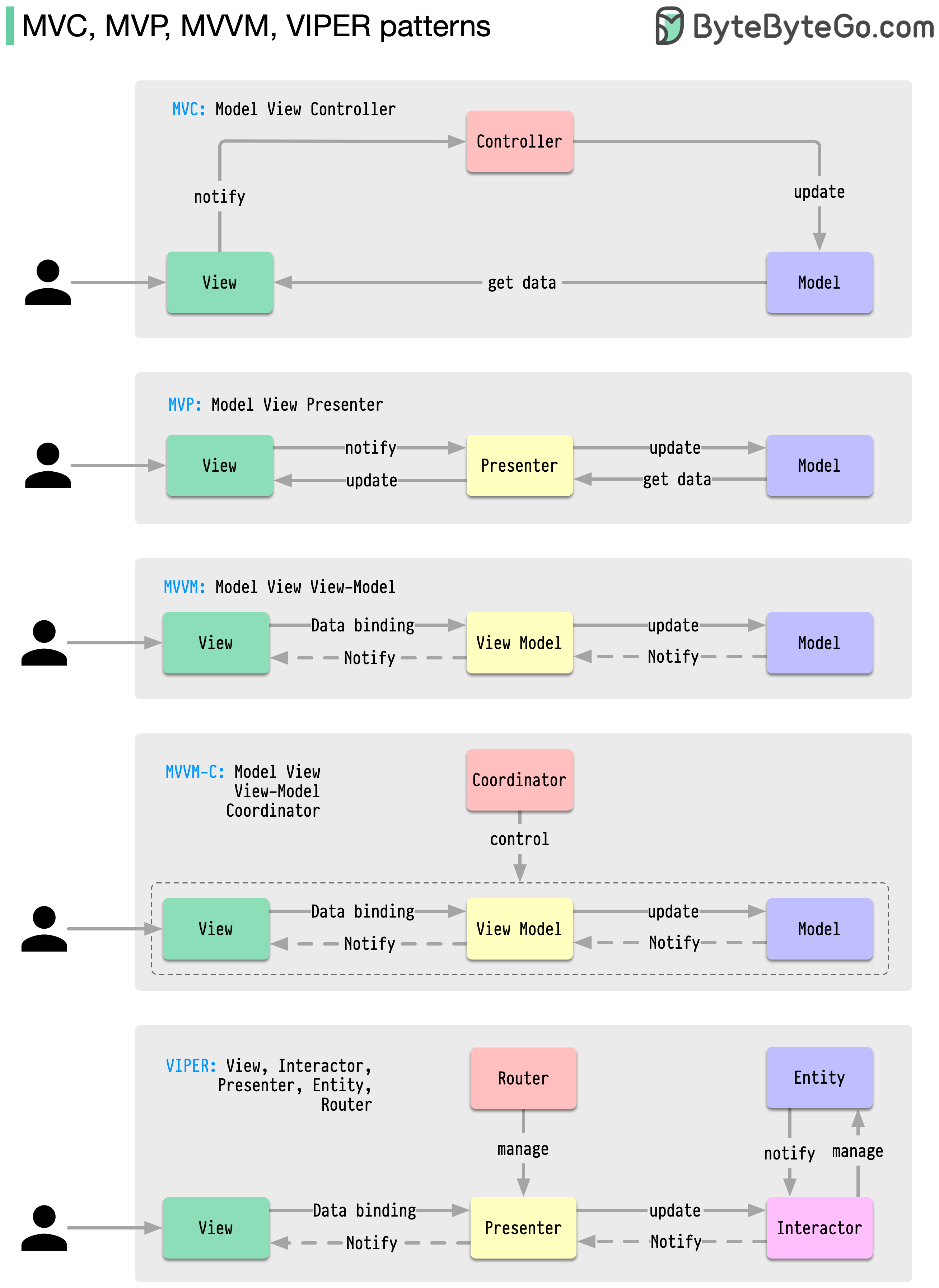
The visual is a responsibility map, not a maturity ladder. Presentation Architecture Variants compares MVP, MVU, MVVM-C coordinators, and VIPER, including the conditions that justify their extra seams. Across all variants, domain behavior must remain independent of UI frameworks.
Pitfalls
Massive Controllers (MVC)
What goes wrong: the Controller accumulates business logic, provider calls, retry policy, and notification side effects instead of delegating to application/domain services. The flow becomes difficult to test as one unit and uncertain retries can duplicate effects.
Why it happens: it is the path of least resistance. The controller already has access to the request, the response, and the DI container.
Mitigation: keep controllers thin. A controller action should: validate input, call one service method, map the result to a view model, and return a response. All business logic belongs in the service or domain layer.
Fat ViewModels (MVVM)
What goes wrong: the ViewModel accumulates business logic, data access, and navigation logic. It becomes a second controller.
Why it happens: the ViewModel is the natural place to put ‘everything the View needs,’ and that scope creeps.
Mitigation: ViewModels should expose observable state and commands. Business logic belongs in services injected into the ViewModel. Navigation belongs in a navigation service, not the ViewModel itself.
Questions
What is the key difference between MVC and MVVM?
In MVC, the Controller handles requests and explicitly selects which View to render — the View is passive. In MVVM, the View binds to the ViewModel’s observable state — the ViewModel does not know about the View. MVVM enables automatic UI updates via data binding; MVC requires the Controller to pass data to the View on each request. Cost: MVVM requires binding infrastructure (
INotifyPropertyChanged,ICommand) which adds boilerplate; MVC is simpler for stateless request/response flows.
Why is the ViewModel more testable than the Controller?
The ViewModel has no dependency on HTTP context, routing, or view rendering — it is a plain C# class. You can unit-test it by calling commands and asserting property values. The Controller depends on
HttpContext,IActionResult, and the MVC pipeline, requiring more setup or integration tests.
References
- Model-View-Controller (Wikipedia) — pattern history, variants, and comparison with MVP and MVVM.
- ASP.NET Core MVC overview (Microsoft Learn) — official guide to MVC in ASP.NET Core with controller, view, and model responsibilities.
- Model-View-ViewModel (Wikipedia) — MVVM pattern origin (Microsoft WPF), data binding mechanics, and comparison with MVC.
- Data binding in WPF (Microsoft Learn) — how
INotifyPropertyChangedandICommandpower MVVM in WPF. - MVVM in .NET MAUI (Microsoft Learn) — MVVM pattern applied to cross-platform .NET MAUI apps.
- Presentation Model — Martin Fowler’s description of a UI-independent presentation state and behavior object, the conceptual base for view-model test seams.
- MVC, MVP, MVVM, and VIPER patterns — ByteByteGo provenance for the responsibility visual; MVVM-C and VIPER are kept client-specific rather than ranked as successors.